How it works
There are two ways a clan gets onto RSClanTrack, and which one you see depends on who you are.
| You are | You get | The result |
|---|---|---|
| Verified, and Admin rank or higher in the clan | The full Register Your Clan form | The clan is added with its profile, and you manage it straight away. |
| Anyone else: not verified, or verified below Admin | A quick add by searching for the clan | The clan is added and tracked, but unclaimed and with no profile. An admin can claim it later. |
Only a proven admin of a clan gets to write its public profile. That is why the full form is kept for them.
A clan that has been added but not claimed still appears on the site, but it only updates about once a week and nobody can manage it. Claiming it switches on live updates, member analytics and the event tools.
Before you start
To register a clan fully, or to claim one, you need:
- A verified RSClanTrack account. If you haven't done that yet, follow Get started first.
- Admin rank or higher in the clan, in game, on the character you verified. That means Admin, Organiser, Coordinator, Overseer, Deputy Owner or Owner.
To quick add a clan you need neither. You don't even need an account.
If your clan was already on RSClanTrack when you verified, and you hold Admin rank or higher, the site may have claimed it for you automatically. Check before doing anything else: if you can already see clan management, you are done.
Step 1: press Register Clan
Press Register Clan, at the top of the site.

The site looks up your character's clan and rank on RuneScape, there and then, and shows you the page that fits.
- If your clan is already tracked, you are taken straight to its page. Skip to Step 3: claim your clan.
- If you see the Register Your Clan form, follow Step 2a.
- If you see Find or add your clan, follow Step 2b.
Step 2a: the full form (verified admins)
Your clan's name is filled in for you.
- Check Basic Information:
- Clan Name: exactly as it appears in game, including spaces.
- Display Title / Slogan: a short line shown with the name.
- Clan Description: what your clan is about.
- Fill in Clan Details. All of these can be changed later.
- Primary Focus: PvM, skilling, social and so on.
- Search Tags: hold Ctrl (or Cmd on a Mac) to pick more than one.
- Primary Language, Home World and Official Timezone.
- Citadel Level.
- Citadel Build Tick (UTC): the day and time your citadel resets each week, in game time.
- Recruitment Status and Discord Invite Link.
- Press Register Clan.
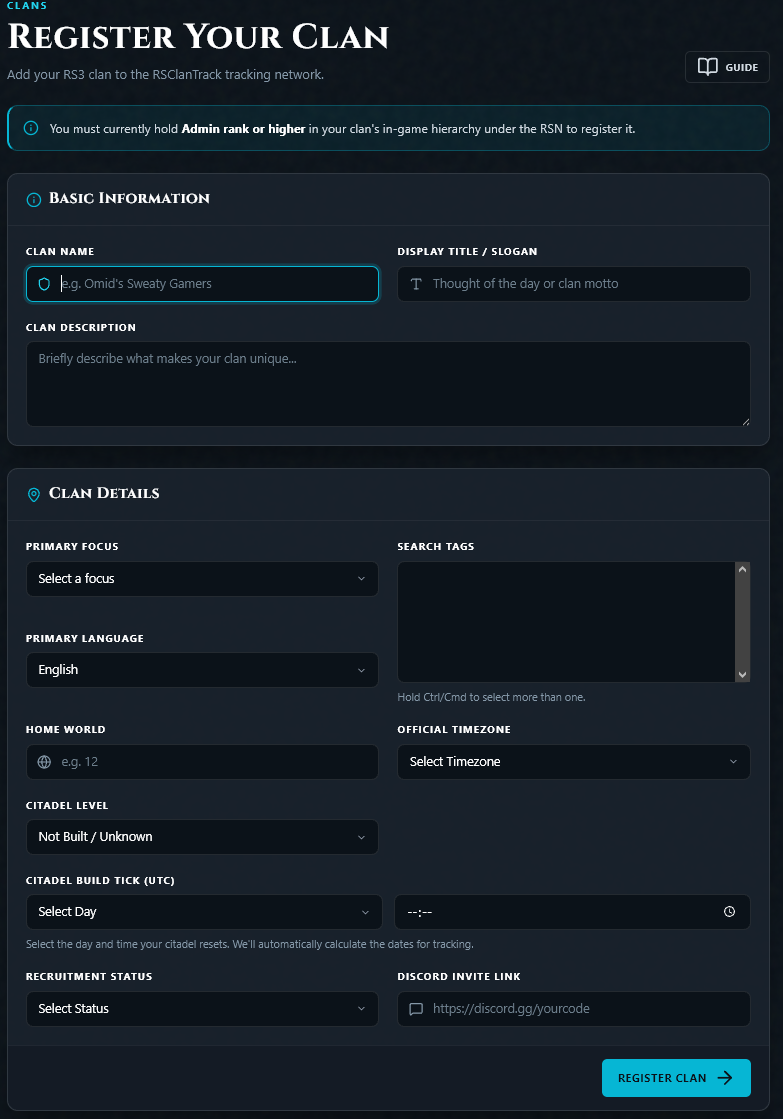
The site checks your rank against RuneScape once more. You then see "... is registered and you now manage it", and land on your clan's new page with clan management open to you. The member list fills in over the next few minutes.
There is nothing to claim: skip to What changes once it is claimed.
Don't know your citadel's exact reset time? Leave it. The site works it out from when your members visit and cap, and you can enter it later in Clan Settings.
Step 2b: quick add (everyone else)
The page shows a search box, with a note of your rank if you are verified.
- Type your clan's name in Search for your clan, exactly as it appears in game.
- If your clan appears in the results, it is already tracked. Click it.
- If it doesn't, press Add "..." as a clan.
The site checks the clan exists on the RuneScape hiscores. If it does, you see "... added! Members are being synced in the background" and land on its page.
The same button is in the search box at the top of every page, so you can add a clan from anywhere.
The clan is now tracked but unclaimed. To manage it, one of its admins needs to claim it, which is Step 3.
Step 3: claim your clan
On your clan's page you see a banner: "... isn't claimed yet".

- Make sure you are signed in and verified.
- Press Claim & Manage This Clan. If you are not signed in, the button reads Register & Claim and takes you through sign-up first.
- The site checks your rank against RuneScape's live clan list, there and then.
- If you are Admin or higher, you see "You now manage ..." and the banner disappears.
That is it. The clan is yours to manage.
What changes once it is claimed
- Faster updates. Members are tracked on the quick schedule instead of about once a week. A full refresh of the clan starts straight away.
- Clan management opens. A Management button appears on your clan's page. It leads to the management area: members, ranks, events, settings and the Discord bot.
- Your other admins get in too. Any member who has a verified RSClanTrack account and holds Admin rank or higher in game can use clan management. They don't need to claim anything.
What to do next
- Tidy your public profile. See Clan settings.
- Add the Discord bot. See Invite the Discord bot.
- Decide who can manage the clan. By default it is Admin and above. The owner can change that in Clan settings.
- Set up rank-ups, if you want them. See Set up rank progression.
- Schedule your first event. See Events and competitions - where to start.
Common problems
"Could not find this clan on the RuneScape Hiscores." Check the spelling and spacing against the name in game. A brand-new clan can take a while to appear on RuneScape's own clan pages.
"... is already tracked here." Your clan is already on the site, and you have been taken to its page. Go to Step 3 to claim it.
I'm verified but I only see the search, not the form. The form is for Admin rank or higher. The page tells you the rank it found for you. If that is wrong, your promotion may not have reached RuneScape's published clan list yet, so try again later.
"Permission Denied: You are ..." The site read your rank from RuneScape and it is below Admin. Ask your clan's owner to claim it, or to promote you first. If it says "not in clan", the character you verified isn't in this clan.
"Verify your account and link your RSN first." You are signed in but not verified. Follow Get started.
"This clan has already been claimed." Someone has claimed it. If you hold Admin rank or higher, you don't need to claim it again: verify your account and clan management opens for you.
Someone who shouldn't have has claimed our clan. Claiming needs Admin rank in game at that moment, so this is usually a former or current admin. If it is wrong, contact RSClanTrack in Discord.
"Could not reach the RuneScape Hiscores - try again shortly." RuneScape's servers didn't answer. Wait a few minutes and press the button again.
"Too many add attempts - try again in a few minutes." There is a limit on how fast clans can be added. Wait and try again.
I was promoted to Admin but the claim is refused. The site reads RuneScape's published clan list, which can lag behind the game. Wait a while and try again.